# W3XShare, W2W data file-sharing

W3XShare leverages blockchain networks, decentralized storage and communication protocols, to provide a secure and self-custodial solution for encrypted data file-sharing between wallets.

<table data-view="cards"><thead><tr><th></th><th></th><th></th><th data-hidden data-card-target data-type="content-ref"></th></tr></thead><tbody><tr><td>💡</td><td><strong>W3XShare</strong></td><td>Learn about the W3XShare data-sharing app.</td><td><a href="/introduction/lets-start">Let's start</a></td></tr><tr><td>⚒️</td><td><strong>Build on W3XShare</strong></td><td>Utalize white-label to launch your data-sharing apps.</td><td><a href="/platform/white-label">White-label</a></td></tr><tr><td>⚙️</td><td><strong>How we build it?</strong></td><td>Discover the modular architecture.</td><td><a href="/platform/architecture">Architecture</a></td></tr></tbody></table>

<figure><img src="https://1559711930-files.gitbook.io/~/files/v0/b/gitbook-x-prod.appspot.com/o/spaces%2Fupu5DkpO9xxR1TUOqQCD%2Fuploads%2FKBY5TEJc6SFDz3IdUjVQ%2FW3XSHARE-banner.png?alt=media&amp;token=5718aa70-9aeb-42b3-9e72-f45268bbe424" alt=""><figcaption></figcaption></figure>

### Test drive the app

<table data-view="cards"><thead><tr><th></th><th></th><th></th><th data-hidden data-card-target data-type="content-ref"></th></tr></thead><tbody><tr><td>⚡️</td><td><strong>W3XShare user guide</strong></td><td>Experience self-custodial data file transfers.</td><td><a href="/overview/user-guide">User Guide</a></td></tr></tbody></table>


# Let's start

Learn about self-custodial data file transfers, learn about the W3XShare, the Web3 alternative to data file sharing.

<table data-view="cards"><thead><tr><th></th><th></th><th></th></tr></thead><tbody><tr><td><strong>Get started</strong></td><td>Learn about W3XShare, decentralized P2P file-sharing platform.</td><td></td></tr><tr><td><strong>Onboard</strong></td><td>Connect your wallet and discover the W3XShare dApp.</td><td></td></tr><tr><td><strong>Build</strong></td><td>Fork the client white-label and depoy your use case secific data-sharing app.</td><td></td></tr></tbody></table>

**Welcome!** This documentation later referred to as Docs will help you learn about W3XShare and help you learn how to use it. Here you will find concepts, how-to guides, quickstarts, tutorials, release notes, and more.

### Context <a href="#context" id="context"></a>

{% hint style="danger" %}
**Problem:** In today’s digital age, data-sharing platforms like WeTransfer have become essential for transferring large files. However, traditional Web2-based solutions often compromise user privacy and ownership. These platforms rely on centralized databases that are vulnerable to data mining, identity theft, and unauthorized access, leading to loss of data ownership and privacy. Additionally, users often have limited control over their data, which can be stored indefinitely or sold for advertising purposes. The lack of true end-to-end encryption and the risk of de-platforming further exacerbate these concerns.
{% endhint %}

{% hint style="success" %}
**Solution:** W3XShare is a decentralized, Web3-based alternative that changes how large and sensitive data is exchanged. Leveraging blockchain networks, on-chain communication, and decentralized storage, W3XShare offers a secure, self-custodial solution for peer-to-peer encrypted file transfers. Unlike traditional platforms, W3XShare ensures data ownership remains with the user, preventing unauthorized access and data mining. It provides an immutable, verifiable, and privacy-focused experience where no personal data is collected.
{% endhint %}

### **Welcome to W3XShare**

{% tabs %}
{% tab title="Intro to W3XShare" %}
{% embed url="<https://youtu.be/nUtEFgNsuiA?si=xahrx-pHO3dLYGiM>" %}
{% endtab %}
{% endtabs %}

We built W3XShare to transform how you share and store data securely in the decentralized world. Our mission is simple: enabling secure, self-custodial file sharing and storage, ensuring that your data remains yours—free from third-party control, data mining, or unauthorized access. W3XShare is your trusted platform for transferring sensitive data, sharing big ideas, and collaborating on projects that matter—without compromising control.

When you’re in control of your data, innovation thrives, and progress prevails. That’s the power of W3XShare—where secure, self-custodial file sharing becomes your new normal.

### Built based on;

{% hint style="info" %}
**Core primitives;**\
\
💡 1 blockchain data-sharing package = 1 L1/L2/L3 transaction \
💡 not your keys = not your data<br>
{% endhint %}

{% hint style="info" %}
**Decentralized principles;**

(1) pseudonymous login via Web3 wallets; \
(2) self-custodial application; \
(3) immutable data file transfers; \
(4) data mining resistant; \
(5) on-chain verifiable; \
(6) communication data is accessible only to the private key owner; \
(7) encrypted attachments and big data files are stored on decentralized storage via PollinationX service; \
(8) self-client custody (e.g. in the case of dApp downtime, the open-source UI client is available); \
(9) settlement based on the native underlying L1/L2 tokens (i.e. ETH, ROSE…); \
(10) No personal data whatsoever is collected, and; \
(11) open-source.
{% endhint %}

{% hint style="danger" %}
**Warning:** W3XShare dApp would never ask for your seed passphrase!&#x20;
{% endhint %}

### Associated Fees <a href="#associated-fees" id="associated-fees"></a>

Web3 mainly works on the PAYGO (i.e. pay-as-you-go) model, meaning the user has to pay for every transaction, ergo pay for every data transfer. To make on-chain communication more viable, development is being done that will in parallel to PAYGO also enable subscription-based models, so the users will be able to pay a monthly subscription fee to access block space and communicate without the hurdle of paying for every transaction. For a deeper look jump to the [Fees](/overview/fees) chapter.

### Official & Infra Partner Links

{% tabs %}
{% tab title="W3XShare" %}

```
https://w3xshare.com
https://wiki.w3xshare.com
https://testnet.w3xshare.com
https://github.com/immu3-io/w3xshare.com
```

{% endtab %}

{% tab title="Immu3" %}

```
https://immu3.io
https://wiki.immu3.io
https://github.com/immu3-io
```

{% endtab %}

{% tab title="PollinationX" %}

```
https://pollinationx.io
https://wiki.pollinationx.io
https://testnet.pollinationx.io
https://app.pollinationx.io
https://github.com/pollinationx
```

{% endtab %}
{% endtabs %}


# FAQ

## Let's get started

**1) What is W3XShare?**\
W3XShare is a decentralized file-sharing platform that allows secure, peer-to-peer data transfers using blockchain technology. It ensures self-custody of data and prevents issues like data mining and ownership loss that are common in traditional Web2-based platforms.

**2) Why is on-chain communication important?**\
You can not achieve "true" decentralized communication that is 100% non-custodial, permissionless, and immutable by utilising any centralized database. In the case of W3XShare, the data file transfer package is represented as an L1/L2 transaction, while the data files themselves are stored on decentralized storage.&#x20;

**3) What are the core principles of W3XShare?**\
The core principles include pseudonymous login via Web3 wallets, self-custody of data, immutable file transfers, resistance to data mining, on-chain verifiability, and decentralized storage. W3XShare operates with no personal data collection and is fully open-source.

**4) How is W3XShare different from legacy platforms like WeTransfer?**\
Unlike WeTransfer, W3XShare uses decentralized storage and blockchain infrastructure, giving users full control over their data. Legacy platforms rely on centralized databases that are vulnerable to data mining and privacy issues. W3XShare is self-custodial, meaning users own and control their data without relying on a central authority.

**5) Who can use W3XShare?**\
W3XShare is a decentralized permissionless application open and available to all. Anyone with an internet connection who has a Web3 wallet and some gas can use the app.&#x20;

## Security and Storage

**6) How does W3XShare ensure data security?**\
W3XShare employs AES-256-GCM encryption for securing data transfers between users. Each file transfer is represented as a blockchain transaction, ensuring immutability and verifiability. The files themselves are encrypted and stored on decentralized storage via PollinationX, which ensures they are encrypted and accessible only to the private key owner.

**7) How does W3XShare handle encryption?**\
W3XShare uses AES-256-GCM encryption for securing data transfers. A random secret key is generated for encrypting files, and this key is shared between the sender and receiver via external communication channels, ensuring end-to-end encryption.

**8) Why do I need the secret key?**\
Encryption is one of the key parts of the solution. W3XShare utilises AES-randomly generated secret key to enable end-to-end encryption. Each secret key is unique and generated automatically for each data file transfer. The transfers can not be decrypted without the secret encryption key!

**9) Does W3XShare collect any personal data?**\
No, W3XShare operates with no personal data collection. It uses Web3 wallet-based authentication, ensuring that all data remains self-custodial and under the user’s control.

**10) What is PollinationX, and how does it work with W3XShare?**\
PollinationX is a decentralized storage service that W3XShare leverages to store encrypted files securely. It uses NFTs to manage storage, allowing users to mint NFTs based on their storage needs, ensuring full control over the data.

**11) What is the data file transfer size limit?**\
The TestNet data file size limit is 100MB. The data file size limit in the MainNet dApp correlates with the purchased PollinationX Storage NFT size (e.g. 5GB, 20GB, 100GB).

## **Technical**

**12) Can I customize W3XShare for my own use case?**\
Yes, W3XShare offers a white-label platform that developers can use to deploy custom data-sharing dApps. This makes it flexible for a wide range of use cases, from corporate file transfers to more niche applications.

**13) What happens if the W3XShare dApp is down?**\
W3XShare is open-source, and the client-side code is available to users. In the event of downtime, users can still access and use the platform through the open-source UI client, ensuring uninterrupted service.

**14) What blockchains are supported by W3XShare?**\
W3XShare supports various L1 and L2 EVM blockchains for settlement and transactions. Check the multi-chain chapter.&#x20;

**15) What is the cost of using W3XShare?**\
Parallel to the underlying L1/L2 transaction gas cost, the service fees (i.e. protocol fees) are also settled on the smart contract level and are applicable for every data transfer transaction. Total user cost equals the sum of the L1/L2 transaction gas and the service fees. The gas and service fees converge and manifest as one end-user communication transaction fee. Read more.


# User Guide

This is the W3XShare user guide. Follow the steps for easier onboarding and access to all needed information.

{% tabs %}
{% tab title="dApp Tutorial" %}
{% embed url="<https://youtu.be/PyLIRirpYuU?si=cOtmUr5BMuWVZcwy>" %}
{% endtab %}

{% tab title="Overview" %}
{% embed url="<https://youtu.be/nUtEFgNsuiA?si=ZMOIjMW87upDu4KC>" %}
{% endtab %}
{% endtabs %}

### How to send data files using W3XShare?

`Step 1:` Install or login to Wallet Connect supported wallet (e.g. MetaMask);

`Step 2:` Check the [Supported Networks](/overview/supported-networks-and-storage) page to select the network of your choosing;&#x20;

`Step 3:` If needed, connect the wallet to the chosen network (e.g. Immu3, Fantom, Edgeware, Oasis...);

{% hint style="warning" %}
**Note:** The sender and receiver must communicate on the same network.
{% endhint %}

`Step 4:` Provide sufficient wallet balance (e.g. IMMU, FTM, EDG, ROSE...);

`Step 5:` "**Connect Wallet"** to the [w3xshare.com](https://w3xshare.com/) **dApp** and confirm the privacy policy and software terms;

`Step 5:` Connect your wallet via **MetaMask** or **Wallet Connect**;

`Step 6:` Claim your **100MB** free PX sNFT (i.e. PollinationX Storage NFT), by clicking on the "**Mint Free 100MB NFT**"

`Step 7:` Confirm the wallet transaction;

{% hint style="success" %}
**Explainer:** The W3XShare is supported by PollinationX decentralized storage NFTs. By utalizing decentralised storage NFTs, you control the storage of your communication data. Mint your NFTs according to the storage needs.
{% endhint %}

`Step 8:` Drop your files in the **"Add new file"** frame;&#x20;

`Step 9:` Fill out the transfer data form;&#x20;

> (1) receiver wallet; \
> (2) sender email; \
> (3) receiver email; \
> (4) transfer title, and; \
> (5) transfer message.

`Step 10:` Sharing the secret encryption key with the receiver;

{% hint style="info" %}
**Explainer:** Your W2W communication is secured natively by the AES-256-GCM encryption algorithm. A random secret key is generated to encrypt content, which is shared between wallet client A (i.e. sender) and wallet client B (i.e. receiver). The receiver obtains the secret key from a sender using external communication (i.e. email, chat…) to decrypt the content.
{% endhint %}

> **Option 1:** "Copy Secret key" and share it with the transfer receiver via external communication (i.e. email, message); \
> **Option 2:** If "Sent to recepient" option is choosen, the secret key will be automatically sent to recepient email address as a part of the unique file download link.

`Step 11:` Hit the **"Transfer"** button and confirm the network transaction. There are three key processes executing within the transfer window;

> (1) zipping attachments\
> (2) storing encrypted attachments to decentralized storage\
> (3) storing encrypted envelope (i.e. JSON file string) on decentralized storage\
> (4) sends/saves the envelope url and checksum as L1/L2 transaction via smart contract\
> (5) sending email to the recepient

{% hint style="info" %}
**Explainer:** The transaction cost equals the sum of the network transaction and service fees. It is settled in the native tokens of the chosen blockchain network (e.g. IMMU, FTM, EDG, ROSE...)
{% endhint %}

`Step 12:` Check your transactions by clicking the Explorer links available in the UI, and;

`Step 13:` The receiver gets the notification in his or her inbox.

### How to receive data files using W3XShare?

`Step 1:` Install or connect to MetaMask or any Wallet Connect supported wallet;

`Step 2:` Connect the wallet to the chosen network;

`Step 3:` Click on the **"Get your files"** link in the received email sent by the W3XShare system; &#x20;

{% hint style="info" %}
**Explainer:** The receiver link includes an encrypted transaction hash and secret key needed to decrypt transferred files.&#x20;
{% endhint %}

`Step 4:` "**Connect Wallet"** to the W3XShare dApp and confirm the privacy policy and software terms;

`Step 5:` If needed paste the **"Secret encryption key"** associated with the transfer that was shared with you by the transfer sender;

{% hint style="danger" %}
**Warning:** The transfers can not be decrypted without the secret encryption key!
{% endhint %}

`Step 6:` Download your files.

{% hint style="info" %}
**Tip:** The download zip file name (e.g. w3xshare\_2023-09-04\_18-47-16\_14.zip) is composed of the date, time and number of included files.
{% endhint %}


# Supported Networks & Storage

We strive to enable access to data file sharing no matter to the native L1/L2.

W3XShare dApp is powered by the \[PX] and \[Mails] smart contracts. It utilises the Immu3 on-chain communication and PollinationX decentralized storage infra to enable self-custodial peer-to-peer data file transfers.

### Deployments & Storage

{% tabs %}
{% tab title="Mainnets" %}

<table><thead><tr><th width="136">Chain List 🔗</th><th>OCC smart contracts 🔗</th><th>Deployment</th><th>PX smart contracts 🔗</th><th>Deployment</th></tr></thead><tbody><tr><td><a href="https://chainlist.org/chain/250">Fantom Opera</a></td><td>[<a href="https://ftmscan.com/address/0x39Dc65b90e9C96828213E1c10073a3Ac9ee00777">Mail</a>]</td><td>15.07.2024</td><td>[<a href="https://ftmscan.com/address/0x1142b080a5493695e3E35c9C4269f6C06B5CE0F4">PXMain</a>]</td><td>15.07.2024</td></tr><tr><td><a href="https://chainlist.org/chain/23294">Oasis Sapphire</a></td><td>[<a href="https://explorer.oasis.io/mainnet/sapphire/address/0x39Dc65b90e9C96828213E1c10073a3Ac9ee00777">Mail</a>]</td><td>09.08.2024</td><td>[<a href="https://explorer.oasis.io/mainnet/sapphire/address/0x1142b080a5493695e3E35c9C4269f6C06B5CE0F4">PXMain</a>]</td><td>08.08.2024</td></tr></tbody></table>
{% endtab %}

{% tab title="Storage" %}

<table><thead><tr><th width="356">Decentralized Storage</th><th width="161.33333333333331">Status</th><th width="182">Version</th></tr></thead><tbody><tr><td>BTFS</td><td>✅</td><td>Alpha</td></tr><tr><td>IPFS</td><td>TBA</td><td>/</td></tr><tr><td>FileCoin</td><td>TBA</td><td>/</td></tr></tbody></table>
{% endtab %}
{% endtabs %}

{% hint style="danger" %}
**Warning:** BTFS is in the alpha version. Use it at your discretion! [Read more](https://gateway.btfs.io/btfs/QmSnAFu4to9G6VpKSzsc7cQ7cg9TMQYVLbsgsowaPWgxkB).
{% endhint %}


# Fees

Smart contract protocol-based W3XShare fees are transparent and applicable to every file transfer transaction.

### Let's Start

Web3 mainly works based on the PAYGO (i.e. pay-as-you-go) transaction model, meaning the user has to pay for every data-sharing transaction. To make on-chain communication more viable, work is being done that will parallel to PAYGO also enable subscription-based models, so the users can pay a monthly subscription fee to access block space and share data without the hurdle of paying for every transaction.

### Fees within the Protocol

Parallel to the underlying L1/L2 transaction gas cost, the service fees (i.e. protocol fees) are also settled on the smart contract level and are applicable for data file transfer transactions. Total user cost equals the sum of the L1/L2 transaction gas and service fees and the cost of decentralized storage. Both, the gas and service fees converge and manifest as one end-user communication transaction fee. Fees are handled by the \[AppFeeManager] smart contract.&#x20;

### Fee Table

{% tabs %}
{% tab title="Blockchain Fees" %}

<table><thead><tr><th width="278.66666666666663">Smart Contract Methods</th><th>Gas Limit</th><th>*Estimated Price in FTM</th><th>*Estimated Price in ROSE</th></tr></thead><tbody><tr><td><code>[Mail]</code> Send Data file Package</td><td>610000</td><td>≈ 0.025 FTM</td><td>≈ 0.061 ROSE</td></tr><tr><td><code>[PX]</code> Mint free package or new storage</td><td>3800000</td><td>≈ 0.15 FTM</td><td>≈ 0.38 ROSE</td></tr><tr><td><code>[PX]</code> Mint Bandwidth</td><td>860000</td><td>≈ 0.03 FTM</td><td>≈ 0.086 ROSE</td></tr><tr><td><code>[PX]</code> Upgrade Package</td><td>1240000</td><td>≈ 0.05 FTM</td><td>≈ 0.12 ROSE</td></tr></tbody></table>
{% endtab %}

{% tab title="Service Fees" %}

| dApp         | Smart Contract | Base Fee                 | dApp Fee                 | Total                          | Bandwidth |
| ------------ | -------------- | ------------------------ | ------------------------ | ------------------------------ | --------- |
| W3XShare App | `[Mail]`       | \~0.0075$ FTM, ROSE... ≡ | \~0.0925$ FTM, ROSE... ≡ | \~**0.1$** ETH, FTM, ROSE... ≡ | 2         |
| {% endtab %} |                |                          |                          |                                |           |

{% tab title="PX sNFT Price" %}

<table><thead><tr><th>Size</th><th>Bandwidth Limit</th><th width="182">Estimated price in $</th><th>Estimated Price in FTM</th><th>Estimated Price in ROSE</th></tr></thead><tbody><tr><td><code>100MB</code></td><td>25 uploads</td><td>Free</td><td>Free</td><td>Free</td></tr><tr><td><code>1GB</code></td><td>50 uploads</td><td>≈ 5$</td><td>≈ 12 FTM</td><td>≈ 80 ROSE</td></tr><tr><td><code>5GB</code></td><td>150 uploads</td><td>≈ 15$</td><td>≈ 35 FTM</td><td>≈ 240 ROSE</td></tr><tr><td><code>20BG</code></td><td>400 uploads</td><td>≈ 30$</td><td>≈ 70 FTM</td><td>≈ 470 ROSE</td></tr></tbody></table>
{% endtab %}

{% tab title="PX Bandwidth Price" %}

| Bandwidth    | Estimated price in $ | Estimated Price in FTM | Estimated Price in ROSE |
| ------------ | -------------------- | ---------------------- | ----------------------- |
| 10 uploads   | ≈ 1$                 | ≈ 3 FTM                | ≈ 16 ROSE               |
| {% endtab %} |                      |                        |                         |

{% tab title="Resources" %}

<table><thead><tr><th width="163.66666666666663">Function</th><th width="196">GAS Tracker</th><th width="207">Unit Converter</th><th>Token</th></tr></thead><tbody><tr><td>Fantom</td><td><a href="https://ftmscan.com/gastracker">Fantom GasTracker</a></td><td><a href="https://ftmscan.com/unitconverter">Fantom UnitConverter</a></td><td>FTM</td></tr><tr><td>Oasis Sapphire</td><td>/</td><td>/</td><td>ROSE</td></tr></tbody></table>
{% endtab %}
{% endtabs %}

### User cost calculation estimate per data transfer transaction (up to 100MB)

Let's assume that:&#x20;

> 100MB PX Storage NFT = Free
>
> Blockchain fees = \~0.009$ FTM ≡
>
> Service base-fee = \~0.0075$ FTM ≡
>
> Service dApp-owner-fee  = \~0.0925$ FTM... ≡
>
> **Total user cost = \~0.109$ FTM... ≡**

{% hint style="info" %}
**\*Note:** Crypto prices are estimated and calculated based on; (1) Fantom 41 GWei, and; (2) Oasis 100 GWei gas price. References to USD prices are made for approximate fiat value illustration purposes only.
{% endhint %}


# Architecture

W3XShare is designed to be as lightweight and modular as possible while retaining core decentralization primitives.

### Let's Start

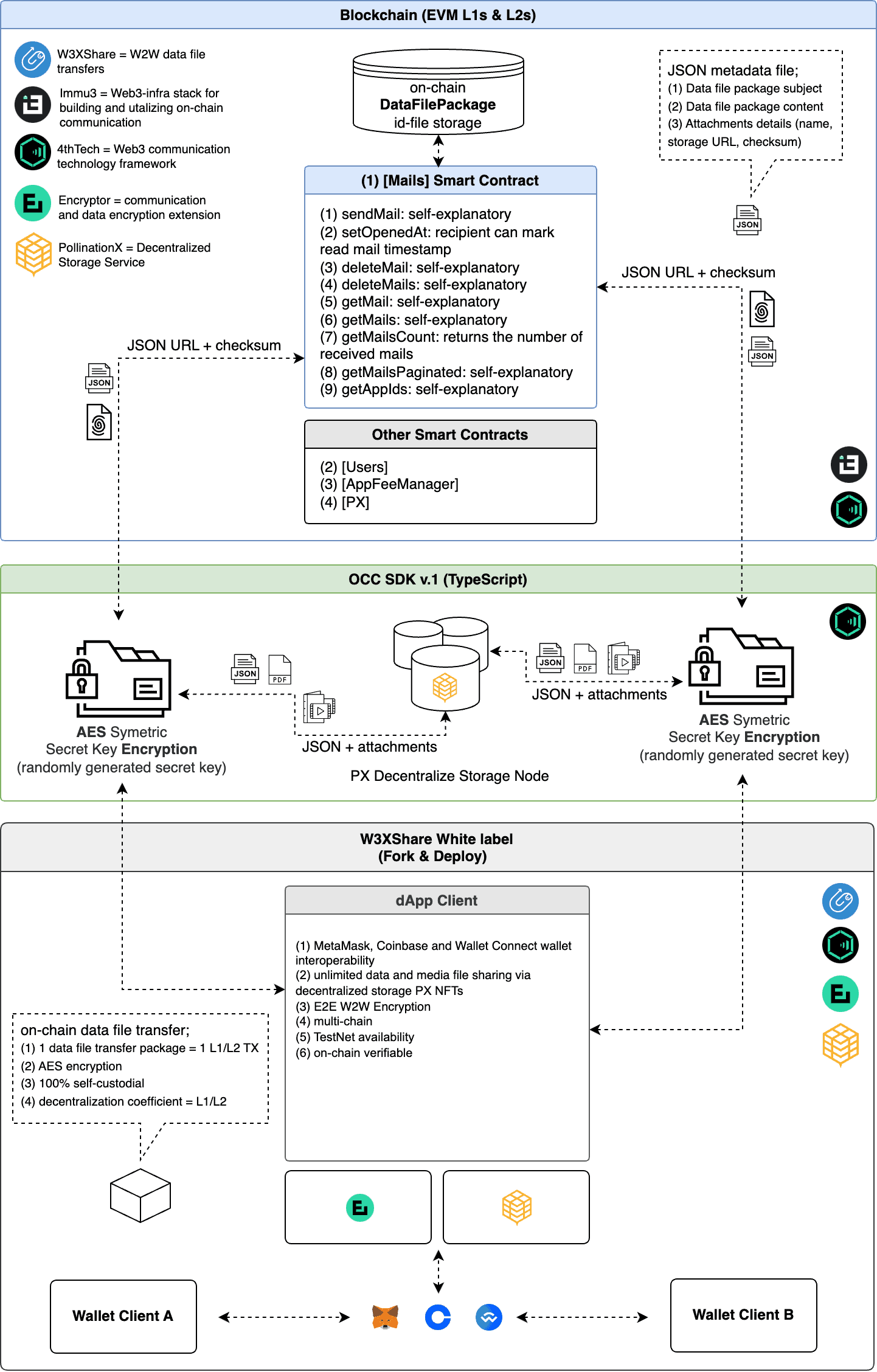
Composed of; (1) subject; (2) content, and; (3) attachment, the data file sharing package can be from a few kilobytes to 100 gigabytes in size. The data file sharing size is limited to the storage size of PX Storage NFT available in the user's wallet.  Based on the OCC (i.e. on-chain communication) Protocol v.1 \[Mails] smart contract, OCC SDKs, PollinationX decentralized storage service, and W3XShare white-label framework, the W3XShare dApp showcases the UI/UX for future on-chain data file sharing.&#x20;

### Technical Stack Schematic

<figure><img src="https://1559711930-files.gitbook.io/~/files/v0/b/gitbook-x-prod.appspot.com/o/spaces%2Fupu5DkpO9xxR1TUOqQCD%2Fuploads%2FvI6FHSxpSA5DOMcpPwYC%2FW3XSHARE-24-comp.png?alt=media&amp;token=179713c2-e242-4aea-939f-dc90f6bcebfc" alt=""><figcaption></figcaption></figure>

### Last Releases

{% embed url="<https://github.com/immu3-io/w3xshare.com/releases>" %}


# Encryption

Encryption is one of the key parts of the solution. W3XShare utilises AES-randomly generated secret key to enable end-to-end encryption.

A random secret key is generated to encrypt content, which is shared between wallet client A (i.e. sender) and wallet client B (i.e. receiver). Content is encrypted with AES encryption (i.e. Advanced Encryption Standard). The receiver obtains the secret key from a sender using external communication (i.e. email, chat…) to decrypt the content.

<figure><img src="https://1559711930-files.gitbook.io/~/files/v0/b/gitbook-x-prod.appspot.com/o/spaces%2Fupu5DkpO9xxR1TUOqQCD%2Fuploads%2FJ8Bdeg1THFcPV2ShlDVW%2Fencryption-w3xshare.svg?alt=media&amp;token=73c0064e-b274-433c-877d-432f5956d000" alt=""><figcaption></figcaption></figure>

{% hint style="info" %}
**Explainer:** Randomly generated secret key must be delivered to the receiver via external communication (email, chat...)
{% endhint %}


# White-label

W3XShare white-label framework lets the developers launch data file transfer dApps out-of-the-box in a matter of hours.

W3XShare white-label framework enables fast and easy deployment of custom-branded data file transfer applications. White-label-based modern minimalistic design style emphasizes simplicity with simple intuitive but effective navigation and setup system. A simple user interface has been developed to offer a step-by-step setup enabling the best possible user experience.&#x20;

{% hint style="info" %}
**Tip:** To begin, we recommend looking at our [Guides](https://github.com/immu3-io/w3xshare-white-label) which include runnable examples and walkthroughs of core usages. These guides will help you better understand how to use the White-label framework and integrate it into your application.
{% endhint %}

{% embed url="<https://github.com/immu3-io/w3xshare-white-label>" %}